




内容纲要

文档嵌入
pdf文件需要用到pdf.js,office文件需要用到微软在线接口
拼接url
https://res.oplist.org/pdf.js/web/viewer.html?file=
https://view.officeapps.live.com/op/embed.aspx?src=
ifame嵌入代码
为了便于统一调整格式,引入class="file-viewer-container"类
对于pdf文件
<!-- 预览 -->
<div class="file-viewer-container" style="position: relative; padding-bottom: 75%; height: 0; overflow: hidden; max-width: 100%;">
  <iframe
    src="https://res.oplist.org/pdf.js/web/viewer.html?file=文件url"
    style="position: absolute; top: 0; left: 0; width: 100%; height: 100%; border: none;"
    allowfullscreen
    webkitallowfullscreen
    mozallowfullscreen
    title="文件预览"
    loading="lazy"
  >
    您的浏览器不支持iframe,请下载附件!
  </iframe>
</div>
对于office文件
<!-- 预览 -->
<div class="file-viewer-container" style="position: relative; padding-bottom: 75%; height: 0; overflow: hidden; max-width: 100%;">
  <iframe
    src="https://view.officeapps.live.com/op/embed.aspx?src=文件url"
    style="position: absolute; top: 0; left: 0; width: 100%; height: 100%; border: none;"
    allowfullscreen
    webkitallowfullscreen
    mozallowfullscreen
    title="文件预览"
    loading="lazy"
  >
    您的浏览器不支持iframe,请下载附件!
  </iframe>
</div>
自定义CSS
/* 统一文件 预览容器样式*/
/* 1. PDF 预览容器样式 */
.entry-content .file-viewer-container {
    width: 100% !important; /* 强制统一宽度 */
    max-width: 100% !important; /* 强制最大宽度 */
    margin: 0 auto !important; /* 强制水平居中 */

    /* 响应式宽高比的关键设置(以下示例为 4:3 宽高比) */
    position: relative !important;
    padding-bottom: 75% !important; /* 强制宽高比 */
    height: 0 !important; /* 强制高度 */
    overflow: hidden !important; /* 强制隐藏溢出 */

    border-radius: 5px !important; /* 强制圆角 */
    border: 1px solid #e0e0e0 !important; /* 强制边框 */
    box-shadow: 0 2px 8px rgba(0, 0, 0, 0.1) !important; /* 强制阴影 */
    background-color: #f0f0f0 !important; /* 强制背景色 */
}

/* 2. 文件 预览 iframe 样式 */
.entry-content .file-viewer-container iframe {
    position: absolute !important;
    top: 0 !important;
    left: 0 !important;
    width: 100% !important;
    height: 100% !important;
    border: none !important; /* 强制移除 iframe 边框 */
    background-color: transparent !important; /* 强制背景透明 */
}
geogebra课件
在Geogebra社区搜索需要的课件,或者自己制作并发布到社区。
找到课件之后,点击右上角三个点再点详细信息
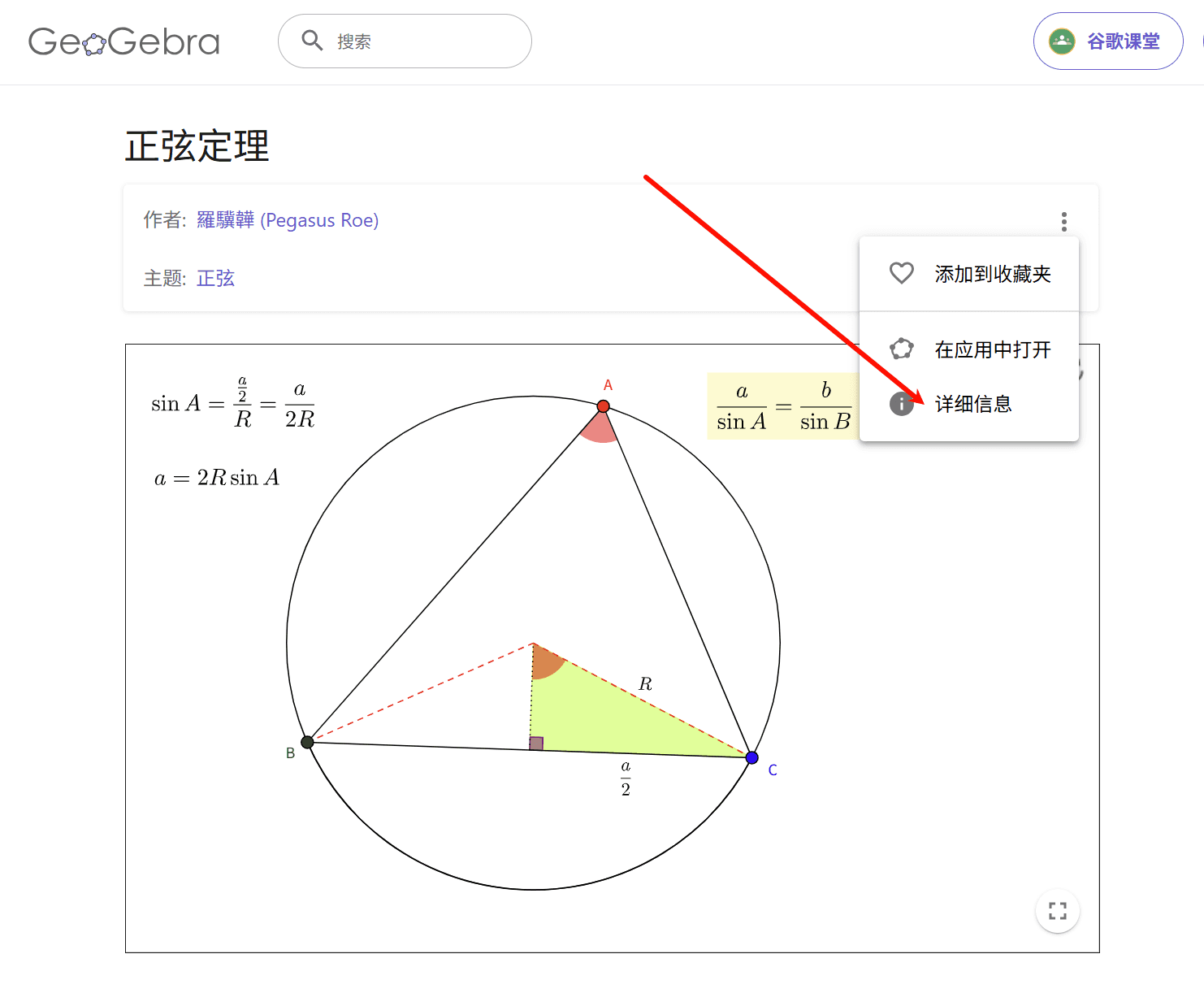
再点分享-嵌入获取嵌入代码
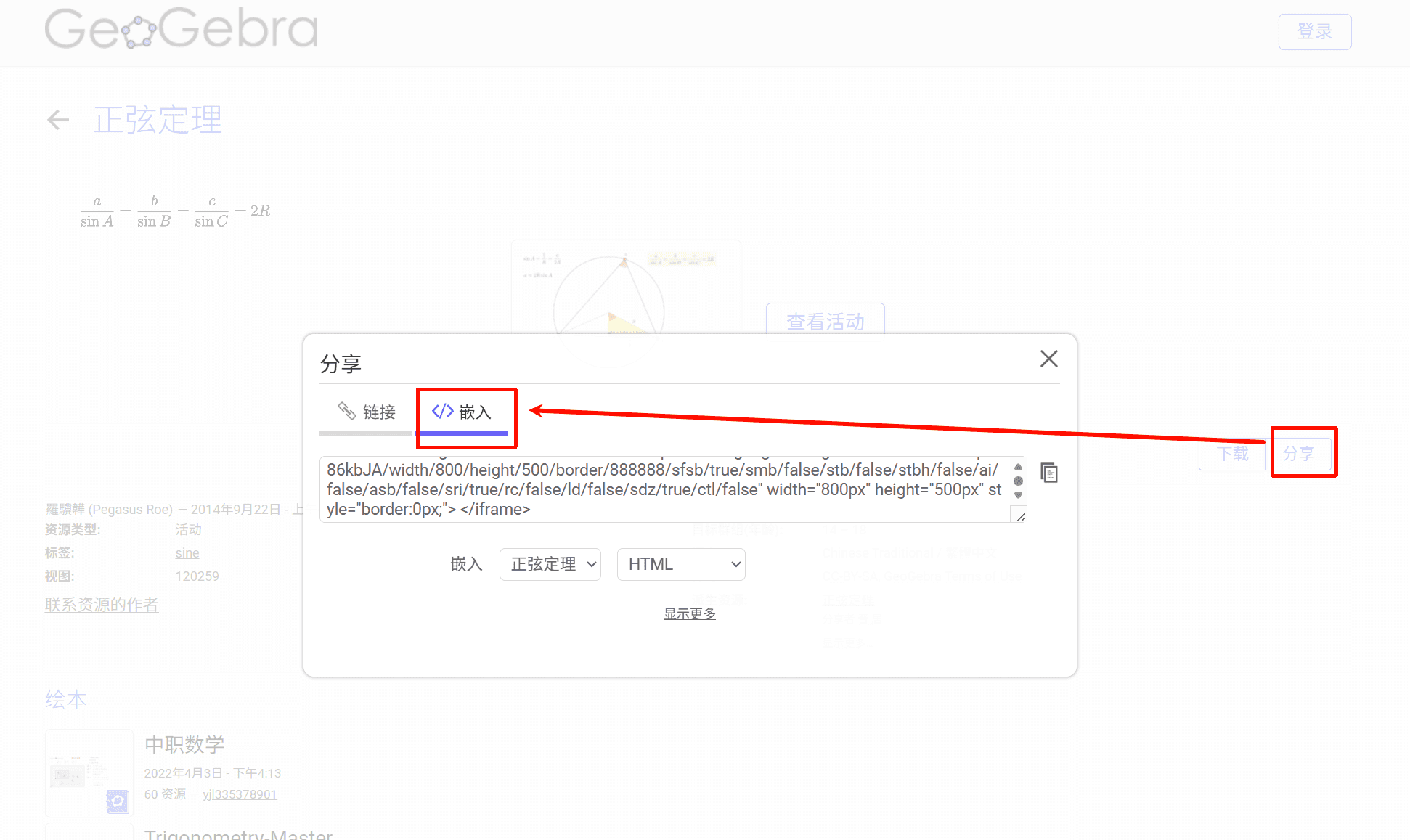
<iframe scrolling="no" title="正弦定理" src="https://www.geogebra.org/material/iframe/id/pP86kbJA/width/800/height/500/border/888888/sfsb/true/smb/false/stb/false/stbh/false/ai/false/asb/false/sri/true/rc/false/ld/false/sdz/true/ctl/false" width="800px" height="500px" style="border:0px;"> </iframe>
<center class="no-indent-block" style="font-size:14px;color:#C0C0C0;text-decoration:underline">题注</center>
嵌入网页
微赞视频
整理2025全球智慧教育大会时候发现微赞的视频可以通过iframe嵌入网页的形式变相载入,但是无法全屏显示
Comments NOTHING